

How to Know If Your Candidate Actually Knows Service Cloud
Recruiter: "Do you have Omni-Channel experience?" Me: "Yes, I've configured Omni-Channel routing across three implementations." Recruiter: "Great! The client needs someone who can manage their social media channels."
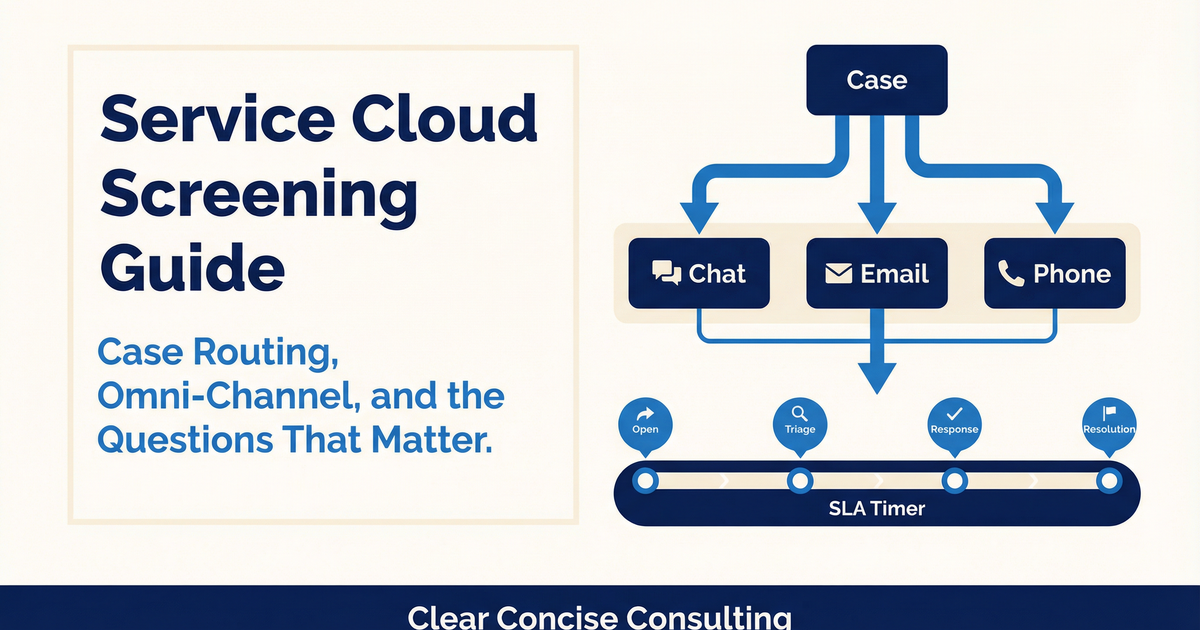
That is not what Omni-Channel means. Omni-Channel is a specific Salesforce feature that routes cases, chats, and other work items to the right agent based on skills and capacity. It has nothing to do with posting on Instagram.
Service Cloud manages customer support operations: case tracking, agent routing, knowledge bases, entitlements (SLA tracking), and multi-channel communication. If a company has a help desk running on Salesforce, they use Service Cloud.
Core Objects
Case: The foundation. Support tickets from customers. Key fields: Status, Priority, Origin, Type, Contact, Account, Owner.
Knowledge (Article): Help articles surfaced to agents or customers. Key fields: Title, Article Type, Data Categories, Publication Status.
Entitlement: SLA agreements per account. Tracks response time commitments.
Milestone: Checkpoints within entitlements that trigger alerts on violation.
Queue: Shared case inbox for team routing.
Service Contract: Master support agreement.
Work Order: Field service job records.
Live Chat Transcript: Chat conversation records.
Experience Tiers
Beginner admin: Case queues, assignment rules, page layouts, email-to-case, case volume reports.
Intermediate admin: Omni-Channel with skills-based routing, entitlement processes with milestones, Knowledge base setup, auto-response rules.
Advanced admin: Complex Flows for case lifecycle automation, Einstein Case Classification, Visual Remote Assistant, Omni-Channel capacity troubleshooting.
Beginner consultant: Support workflow documentation, case category mapping.
Intermediate consultant: Multi-tier support model design, SLA management, service console layouts, UAT scripts.
Advanced consultant: Omni-channel strategy across chat, email, phone, and messaging. Knowledge management architecture. Executive SLA dashboards.
Five Screening Questions
1. "How did you configure case routing?" Strong: Describes assignment rules, queues, or Omni-Channel. Explains skill-based vs. round-robin logic. Red flag: Does not know the difference between assignment rules and Omni-Channel. Fundamentally different approaches.
2. "Have you set up entitlements or SLA tracking?" Strong: Describes entitlement processes, milestones, and violation behavior. Red flag: Confuses entitlements with escalation rules. Related, different purposes.
3. "Walk me through Salesforce Knowledge." Strong: Article types, data categories, publishing workflows, surfacing to users. Red flag: Has never configured Knowledge from scratch.
4. "How do you measure support team performance?" Strong: First response time, resolution time, CSAT scores, case volume by channel. Red flag: Cannot name standard Service Cloud metrics.
5. "Have you implemented Omni-Channel?" Strong: Configures for specific channels. Explains routing, capacity settings, presence statuses. Red flag: Confuses the Salesforce feature with general "multi-channel support."
How to Tell If Someone Is Lying
"An escalation rule fires but the case isn't being reassigned. What do you check?" Real: Knows only one escalation rule can be active at a time. Checks entry criteria. Verifies action type. Checks business hours configuration (timers respect business hours). Fabricated: "I would check the rule." That's three words, not a diagnostic process.
"What happens when an Omni-Channel agent's capacity is full?" Real: Work items queue until capacity frees. Different work types can have different capacity weights. Fabricated: Does not know capacity has weights.
"Agents are closing cases without resolution notes. How do you prevent this?" Real: Validation rule on Status = Closed requiring Resolution Notes. A screen Flow also works before status change. Fabricated: "I would tell the agents to fill it out." Admins solve this declaratively, not verbally.
Job Description Mistakes
If you see: "Service Cloud and Sales Cloud experience required" as equal priorities Change to: Specify which is primary. Most implementations have a dominant Cloud.
If you see: "Chat and phone integration" without naming tools Change to: "Omni-Channel routing and [Amazon Connect, Five9, etc.]"
If you see: "Must have ITIL certification" for Service Cloud Change to: ITIL is a bonus. Service Cloud is CRM, not ITSM.
Part 3 of a 10-part series. Previously: Sales Cloud Screening Guide. Next: Marketing Cloud Screening Guide
Free Download: Service Cloud Screening Guide
Jeremy Carmona is a 13x Salesforce certified architect, founder of Clear Concise Consulting, and former Salesforce instructor at NYU Tandon School of Engineering.
